Wallet Quick Reference
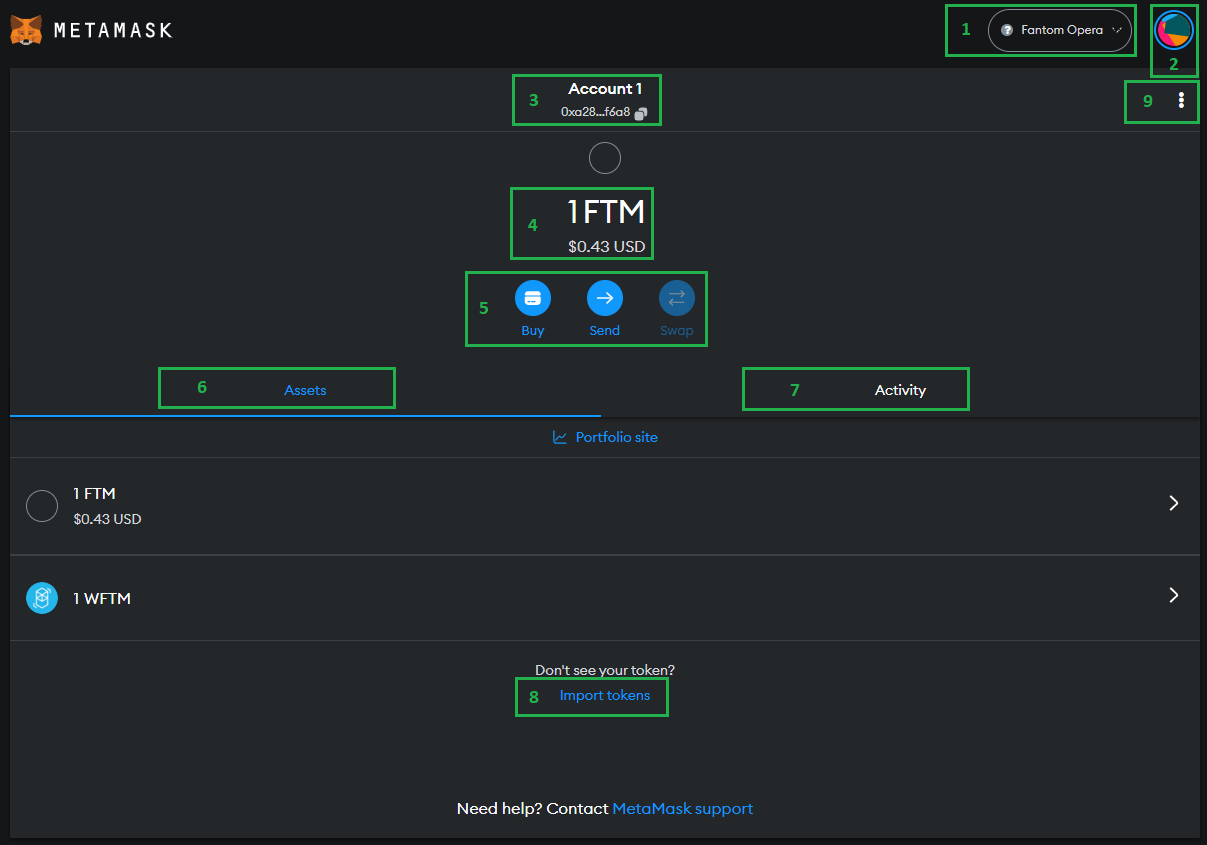
- CURRENT NETWORK - Click to change to different network or add a network.
- ACCOUNT IDENTICON - Click to change account or add new accounts or access settings.
- ACCOUNT NAME AND WALLET ADDRESS - Name of currently selected account and the wallet address. Click the wallet address to copy it to the clipboard.
- ACCOUNT BALANCE - Will always display native token/coin value and converted value in whichever currency you set in settings.
- QUICK ACTIONS - Buy native token, send between wallets or to others, and swap tokens (not available on all networks).
- ASSETS - Click here to see current assets in this wallet. You will need to add tokens (point 8) for them to be visible.
- ACTIVITY - Click here to show most recent activity done within the wallet. If you reset Metamask or interact elsewhere it wont show here but will on the blockchain explorer (point 9)
- IMPORT TOKENS - Import tokens by contract address see add tokens page.
- ADDITIONAL MENU - View this wallet on the blockchain, view account details and sites connected to this wallet.
Back to top